Most retail traders in Indonesia track their positions the slow way. They save broker flow screenshots, copy numbers into Excel, and try to spot average down behavior by eye. By the time the analysis is done, the market has already moved. This article is for retail stock traders and Stockbit users, and it solves the problem of slow and manual portfolio analysis by combining Stockbit screenshots with Gemini AI to calculate buying patterns, average downs, and accumulation versus distribution behavior in minutes instead of hours.
The insight is simple. The screenshots already exist. The trading data is already there. The only missing piece is a fast way to read it. That missing piece is now a free AI model, and it changes how retail traders can work.
The Problem with Manual Portfolio Tracking
Retail traders in the Indonesian market, especially on Stockbit, are expected to do analysis that professional desks automate. Tracking average down positions, broker flow behavior, and accumulation versus distribution across multiple stocks is technically possible by hand, but it is not realistic as a daily workflow.
The pain points are consistent:
- Average down calculation requires summing weighted buy prices, which is tedious in spreadsheets and easy to get wrong.
- Accumulation versus distribution patterns are usually identified visually, but only after staring at a chart long enough to notice the trend.
- Broker flow behavior is captured in screenshots, but those screenshots pile up unread in folders.
- Portfolio movement over time is hard to summarize without building a custom dashboard, which most retail traders do not have time for.
- Beginners often misinterpret the same data differently each session, so conclusions are inconsistent.
The result is a lot of effort spent collecting data, and very little time spent actually acting on it.

How Stockbit Plus Gemini Replaces the Spreadsheet
The workflow collapses three steps into one. Screenshot the relevant Stockbit view, upload it to Gemini, and ask the AI to interpret the trading data directly.
The setup has two ingredients:
- Stockbit: Use the screenshot or export feature for broker flow, trading history, or bandarmology view. The improved export quality on Stockbit makes the numbers clean enough for AI to read reliably.
- Gemini AI: Upload the screenshot and ask for a structured summary. For example: summarize buying activity, average buy price, broker behavior, and whether the pattern looks like accumulation, distribution, or active trading.
What used to take thirty to sixty minutes in Excel now takes two to five minutes, including the time to read Gemini’s response and validate the numbers.
The model can also classify market behavior using simple color rules that retail traders already use on Stockbit charts:
- Red Bars: Average down plus accumulation, where a holder is adding to a losing position while smart money quietly builds.
- Blue Bars: Heavy distribution while retail absorbs the selling, a warning sign that prices may be near a top.
- Purple Transition: An active trading phase where both sides are present and direction is undecided.
- Deeper Purple: A stronger distribution phase, often associated with continued downside unless buyers step in.
These color patterns are not new. What is new is that a trader can ask Gemini to flag which colors dominate in a screenshot and what they imply, instead of squinting at the chart and guessing.
A Practical Workflow You Can Use Today
A repeatable workflow for retail traders looks like this:
- Open Stockbit, go to the broker flow or bandarmology view for the stock you want to analyze.
- Screenshot the relevant window, including the date range, prices, and broker summary.
- Upload the screenshot to Gemini with a clear prompt. For example, calculate the average buy price, total shares accumulated, and whether the pattern is accumulation, distribution, or active trading.
- Cross check Gemini’s interpretation with one manual look at the chart. If both agree, you have a strong read in minutes. If they disagree, that is a signal to slow down and look closer.
- Save the Gemini response alongside the screenshot. Over time this builds a personal journal of how the stock behaved before major moves.
The most important step is step four. AI is fast, but it is not infallible. The traders who benefit most from this workflow are the ones who use Gemini to compress the work, not to replace the thinking.
What Traders are Saying
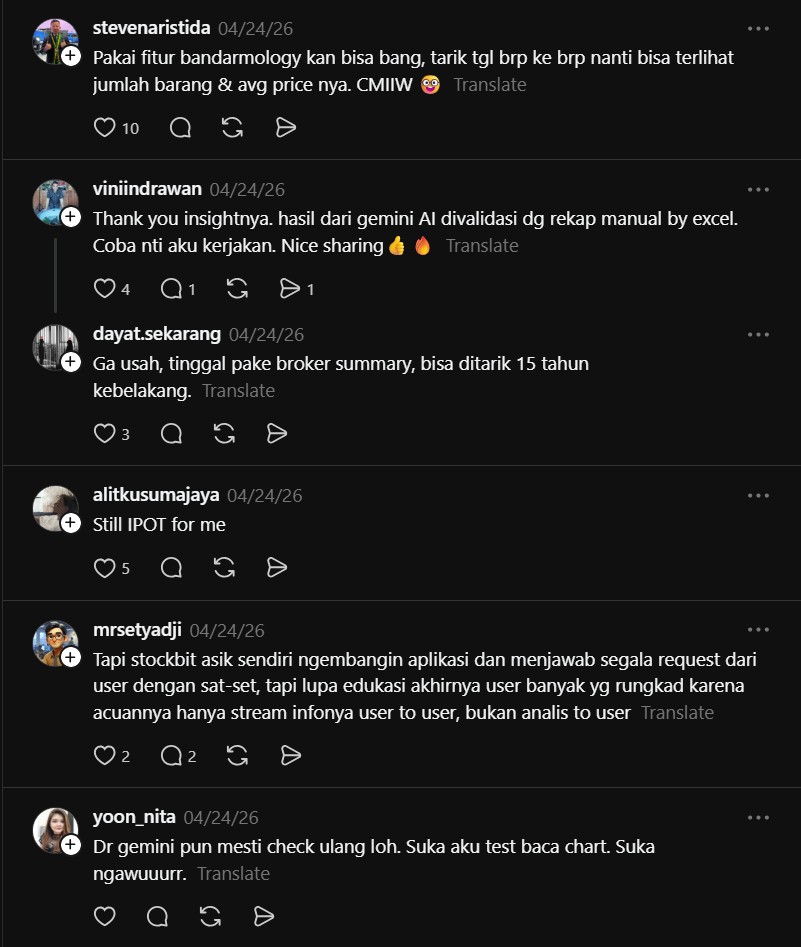
The reaction from the Stockbit community shows two things. First, traders are hungry for faster analysis. Second, they are testing the AI workflow against their existing methods and finding it holds up.
stevenaristida (@stevenaristida) said:
“You can use the bandarmology feature, bro. Drag it to a certain date and you will see the number of items and their average price. CMIIW.”
This comment is a useful reminder that Stockbit itself already has built in tools for some of this analysis. The AI workflow does not replace the native feature, it complements it, and traders who combine both get the best of speed and accuracy.
viniindrawan (@viniindrawan) said:
“Thank you for the insight. Result from Gemini AI validated with manual recap by Excel. I will do it later. Nice sharing.”
This is the strongest endorsement the workflow can get. A trader took the time to compare Gemini’s output with a manual Excel recap, and the AI held up. When a method survives that kind of validation, it is worth integrating into a regular routine.
Final Take
Retail trading analysis in 2026 does not have to be a spreadsheet hobby. Screenshot, upload, ask Gemini, and verify. That single loop turns a 30 minute chore into a 5 minute habit, and it puts the focus back on decisions instead of data entry. The traders who adopt this loop early will spend less time collecting numbers and more time acting on them.

