Most content creators do not struggle with creativity. They struggle with chaos. Ideas live in five different apps, scripts are written from memory, research is done only when inspiration hits, and editing tools change every week. The result is not bad content, it is inconsistent content, and inconsistency is what kills growth on every platform. This post is for content creators, influencers, and digital marketers who want a real production system instead of a stack of disconnected tools.
The problem this solves is fragmented and inefficient content production. The fix is treating your creator workflow as a pipeline with phases, and assigning the right tool to each phase so the work compounds instead of restarting from zero every week.

Why Tools Alone Will Not Save Your Content
A common mistake is collecting apps. A creator installs Notion, then CapCut, then Descript, then switches to DaVinci, then bounces back. Each tool is fine on its own, but together they form a patchwork that creates more decision fatigue than productivity.
A working toolstack needs three things:
- Phase Coverage: Tools for research, planning, production, and publishing, not just editing.
- Handoff Clarity: Output from one phase should flow into the next without reformatting.
- Personal Fit: A tool only matters if you actually open it on a deadline day.
The toolstack below is built around that principle.

The Research Phase: Deciding What to Make
Before you write a single line of script, you need to know what is worth making. This phase is where most creators skip work, and it is also where the best content gets its edge.
- Grok: Real time trend detection. Useful for catching breaking topics, monitoring cultural moments, and generating angle ideas before competitors move.
- Claude: Long form research and structural analysis. Good for breaking down why a viral video worked, summarizing long articles, and turning rough notes into a script outline.
- YouTube: The most underrated research engine. Search your topic, study the top performing videos in your niche, analyze hooks, pacing, and thumbnail patterns. Treat it as a database of what already works.
Together these three cover trend scouting, idea validation, and script drafting. That is enough to leave the research phase with a clear concept and a working draft.
The Planning Phase: Staying Consistent When Motivation Drops
Creators do not burn out from making content. They burn out from deciding what to make. Planning tools remove that daily decision.
- Google Calendar: A hard publishing schedule. Block filming days, editing days, and publish slots. If it is not on the calendar, it does not exist.
- Notion: The central hub for ideas, scripts, analytics, and content briefs. A single Notion database with status columns (idea, scripting, filming, editing, published) turns your backlog into something you can actually see and progress through.
- Miro: Visual thinking for content strategy. Useful for mapping funnels, content pillars, and series arcs. When you can see the structure, you stop repeating yourself and start building a recognizable brand shape.
This phase is the difference between creators who post 4 times a month and creators who post 20.
The Production Phase: Turning Scripts into Video
Once you have a script and a calendar slot, execution should feel mechanical. The right editing tool depends on the type of content.
- Instagram Edits: Built for short form, mobile first creators. Fast turnaround, native to the platform, good for trend reactive content.
- CapCut: The workhorse for most TikTok and Reels creators. Strong template system, auto captions, transitions, and effects tuned for short form pacing.
- DaVinci Resolve: For long form YouTube content, high production value, or creators who want full control over color grading, audio, and multicam. Steeper learning curve, but the free tier is powerful.
The rule is simple. Match the tool to the content type. Do not edit a one take talking head in DaVinci when CapCut will do it in ten minutes, and do not try to color grade a brand film in a mobile app.
The Full Pipeline in One Line
Idea from Grok or YouTube, script from Claude, scheduled in Google Calendar, tracked in Notion, mapped in Miro, edited in CapCut or DaVinci, published on Instagram Edits or wherever the platform lives. One system, end to end, repeatable every week.
What Creators are Saying
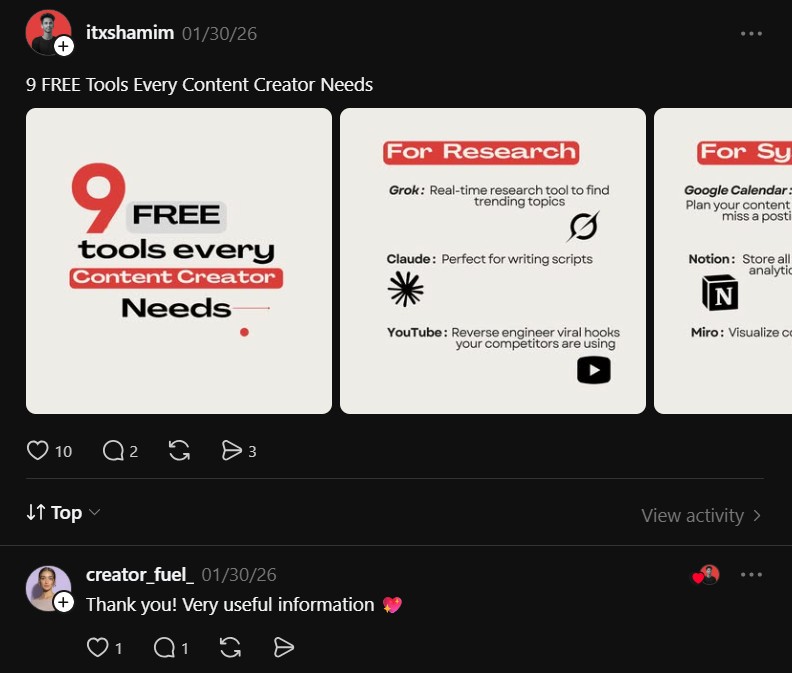
Reaction from the creator community around this kind of structured breakdown is usually one of relief, because most creator content is about single tools, not full systems.
creator_fuel_ (@creator_fuel_) said:
“Thank you! Very useful information.”
The simplicity of that comment is the point. A workflow that gets summarized cleanly is a workflow that can actually be implemented. When creators say this kind of thing, it usually means the system clicked, which is the moment a messy workflow starts becoming a real production engine.

