
MagicPods is a free open-source Windows application that adds native AirPods integration to Windows 10 and 11. It provides real-time battery status popups, automatic pause/play when removing earbuds, and smooth connection management. The tool works with all AirPods models and most Windows-compatible Bluetooth adapters. MagicPods runs quietly in the background, requiring no configuration after initial setup.
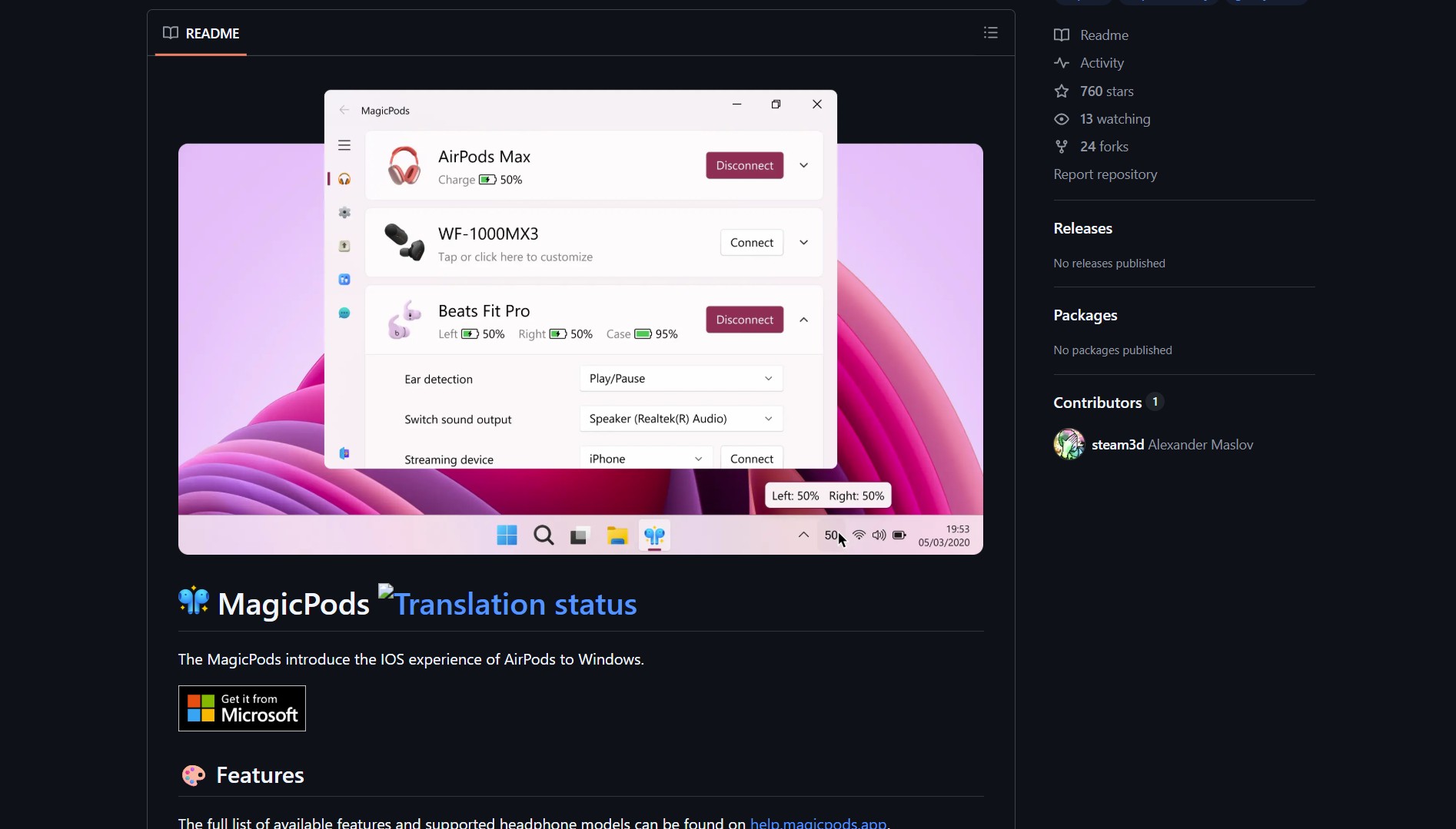
MagicPods solves the problem of missing native integration by bringing Apple-like features to Windows. No more guessing battery levels or manually pausing when you remove an earbud. The application runs as a lightweight system tray utility, providing macOS-style battery popups and auto-pause functionality. It supports AirPods 1, 2, 3, AirPods Pro, and AirPods Max.
Features & How It Works
MagicPods delivers several key features that bridge the gap between Apple and Windows ecosystems:
- Battery Popups – macOS-style popups showing individual earbud and case battery levels
- Auto-Pause – Automatically pauses audio when you remove an earbud, resumes when re-inserted
- Connection Management – Quick connect/disconnect from system tray
- Lightweight – Minimal resource usage, runs as a background service
- Open Source – Full source available on GitHub under MIT license
The tool detects paired AirPods automatically and starts providing enhancements immediately. It requires .NET 6.0 Runtime if not already installed on the Windows system.
Project Link
Project link:
https://github.com/steam3d/MagicPods-Windows
How to Install & Setup
- Download the latest release from the GitHub repository
- Run the installer (requires .NET 6.0 Runtime if not already installed)
- Pair your AirPods with Windows Bluetooth settings as usual
- MagicPods automatically detects them and starts providing enhancements
The installation process takes under two minutes. Once set up, MagicPods runs silently in the system tray, requiring no further interaction unless you want to check battery levels or disconnect.
The Verdict
MagicPods exemplifies how open-source tools can smooth over the rough edges between competing tech ecosystems. By providing what platform vendors haven’t, it turns a frustrating cross-platform experience into a smooth one. The debate about what constitutes “native” integration highlights an important point: MagicPods fills a gap that Microsoft and Apple have left open.
For Windows users with AirPods, this tool eliminates battery anxiety and preserves productivity. It makes high-end Apple accessories fully functional in Windows environments, saving the cost of buying separate Windows-optimized headphones. Like other open-source projects such as FlipOff and Arnis, MagicPods demonstrates that community-driven solutions often outperform corporate offerings for niche needs.
- How to Get Better AI Answers with LLM Council Multi-Model Debate
LLM Council sends your query to multiple models and synthesizes the best answer Instead of asking just one LLM for..
- How to Get an AI-Powered Dev Team Inside Your Code Editor with Roo Code
Roo Code redefines editor‑based AI assistance by deploying a multi‑modal dev team directly inside VS Code or JetBrains IDEs. It..

